Proxmox
Proxmox cluster setup: quorum, HA and failover
A Proxmox cluster is a group of servers that share configuration and state through Corosync and, with high availability configured, restart virtual machines on a healthy node when one fails. HA needs at least three votes, a cluster network with latency under 5 milliseconds and storage every node can reach. You create the cluster with pvecm create and pvecm add.
Rackone · 12 min read
In this article
What is a Proxmox cluster and how does it work?
A Proxmox cluster is a group of Proxmox Virtual Environment (Proxmox VE) servers that behave as one platform: they share configuration, users and storage definitions, and with high availability they restart virtual machines on a healthy node when another one fails. Each node runs Corosync, the cluster communication engine, which counts votes and decides whether the group has a majority. Our Proxmox services include cluster design.
The cluster file system, pmxcfs, is mounted in /etc/pve and replicates the configuration of virtual machines, storage and users to every node. Changes to that shared state are allowed only while the cluster has quorum.
How many nodes does a Proxmox cluster need?
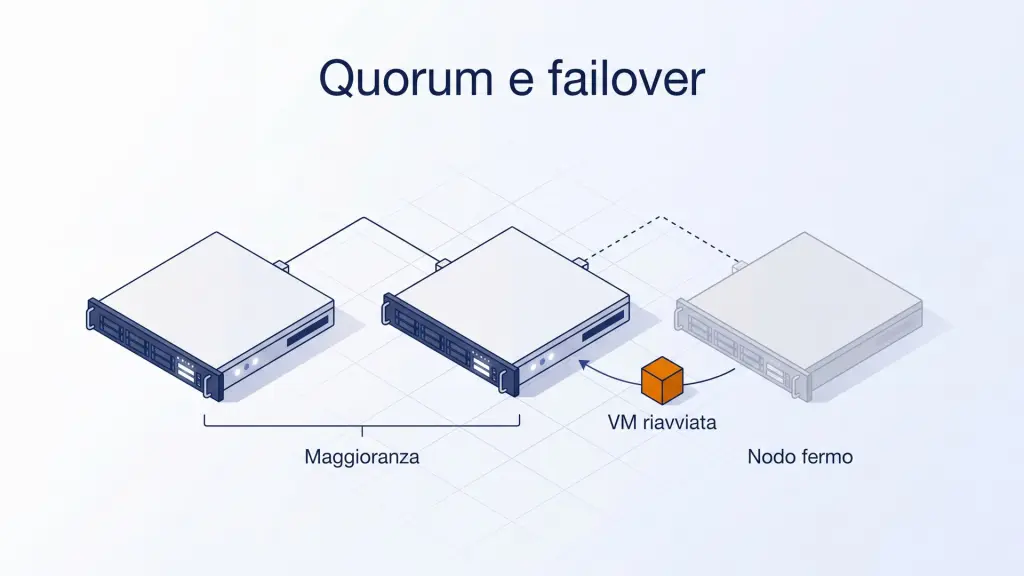
A cluster with high availability needs at least three votes, meaning three nodes or two nodes with an external QDevice. Quorum is calculated by majority, and with three votes the cluster survives the loss of one server. The Cluster Manager documentation gives three nodes as the minimum for a reliable quorum and recommends the same Proxmox VE version on all of them. Two versions coexist only during an upgrade, which you run one node at a time following the official upgrade guide for that release.
The number of nodes sets how many failures the cluster tolerates. An even number adds no tolerance: four nodes survive one failure, like three, with one more server to manage.
| Nodes | Votes for quorum | Failures tolerated | When it makes sense |
|---|---|---|---|
| 2 | 2 (2 out of 3 with a QDevice) | none (1 with a QDevice) | small sites, only with an external QDevice |
| 3 | 2 | 1 | the minimum for production with HA |
| 4 | 3 | 1 | growth in capacity, not in tolerance |
| 5 | 3 | 2 | critical workloads, maintenance even with one node already down |
Beyond five nodes the cluster network and the storage matter most.
The two-node cluster and the QDevice
A two-node cluster loses quorum as soon as one node goes offline, because the remaining node holds one vote out of two. Proxmox solves this with the QDevice: an external service, corosync-qnetd, installed on a third host that can be small, which supplies the missing vote.
# on the host outside the cluster
apt install corosync-qnetd
# on all cluster nodes
apt install corosync-qdevice
# from one cluster node
pvecm qdevice setup <QDEVICE-IP>
The QDevice is not a cluster node: corosync-qnetd gives its vote to one partition at a time, the one that reaches a majority with that vote. If the two nodes can no longer talk over Corosync but both reach the QDevice, only one of them gets the vote and keeps quorum. Unlike Corosync, the QDevice connects over TCP/IP and does not need low latency, so it can run outside the cluster LAN, for example at another site.
In a stretched Ceph cluster spread over two sites, a QDevice is not enough. The Proxmox wiki on the Stretch Cluster calls for a Proxmox VE tie-breaker node at a third site, which gives Corosync the deciding vote and hosts a Ceph monitor for the storage tie-break. With two sites and no Ceph, for example with ZFS replication, the third vote is needed only by Corosync and can be a QDevice.
With an odd number of nodes the documentation advises against a QDevice: it would provide N-1 votes, and if the QDevice fails, losing a single node is enough for the cluster to lose quorum.
How does quorum work in Proxmox VE?
Quorum is the majority of votes a cluster must hold to change its own state: each node counts as one vote, and without a majority the cluster goes read-only. The Proxmox quorum mechanism protects the cluster against split-brain, the situation in which two isolated parts of the cluster operate independently on the same disks.
Without quorum:
- the configuration in
/etc/pvecannot be modified; - virtual machines cannot be started, created or migrated;
- nodes with active HA resources let the watchdog expire and, according to the HA documentation, reboot after 60 seconds.
Virtual machines already running on nodes without HA stay up. To see votes, nodes and quorum state, run pvecm status.
What network does Corosync need?
Corosync uses little bandwidth but needs low, steady latency. The documentation asks for latency under 5 milliseconds between all nodes: in practice, the latency of a local network. A dedicated 1 Gbit network card is enough in most cases. Keep the cluster network separate from the one used by virtual machines, storage and migrations: a backup (for example to Proxmox Backup Server) or a migration that saturates the link causes Corosync messages to be lost, and a node that stops answering is cut off.
Before creating the cluster, check the requirements listed in the Cluster Manager documentation:
- UDP ports 5405 to 5412 open between all nodes, plus SSH on TCP port 22;
- date and time synchronized on every node;
- a second Corosync link on a different physical network, so the cluster stays up if the first link fails;
- no bond as the only cluster link: in some failure scenarios it does not give the redundancy you expect.
The Proxmox VE 9.2 release notes (May 2026) report that new clusters are created with a token coefficient of 125 milliseconds, which shortens the time the cluster needs to re-form after a node failure. On existing clusters, check the latency requirements before lowering it, as the documentation advises.
How do you create a Proxmox cluster?
You create a Proxmox cluster with pvecm create on the first node and pvecm add on each of the others; the nodes need their final host name and IP address first, because neither can be changed after the cluster is created. A node that joins must not hold any virtual machines, because its configuration in /etc/pve is overwritten.
Install the same Proxmox VE version on all nodes (verify it on each node with
pveversion) and check that time is synchronized.Create the cluster on the first node, specifying the two Corosync links:
pvecm create CLUSTERNAME --link0 10.10.10.1 --link1 10.20.20.1Run
pvecm addon each node you want to add, giving the address of the first node and the local addresses of the two links. You need the root password of the node already in the cluster.pvecm add 10.10.10.1 --link0 10.10.10.2 --link1 10.20.20.2Check the result with
pvecm status(votes and quorum) andpvecm nodes(list of members).
In the web interface the procedure is the same: under Datacenter → Cluster, use Create Cluster on the first node, then Join Information to copy the join data and Join Cluster on the others.
How do you configure a VM for high availability?
You add a resource to HA from Datacenter → HA or from the command line, and the machine's disk must be reachable from all nodes. Proxmox HA then restarts the virtual machine on another node when its own node fails. The disk can sit on shared storage such as Ceph, NFS, iSCSI or Fibre Channel, or on local storage with the built-in ZFS replication, which is asynchronous, so after a failover the VM restarts from the last completed replica and loses later changes. Hyper-converged Proxmox (in Italian) describes designs with integrated Ceph.
On the command line:
ha-manager add vm:100 --state started --max_restart 1 --max_relocate 1
ha-manager status
Before restarting the machine elsewhere, the cluster must make sure the failed node no longer writes to the disks. Proxmox VE fencing uses a watchdog: if the node loses quorum, the timer expires after 60 seconds and the server reboots. According to the HA documentation, detection and failover usually take about two minutes. It is a restart, not a live migration.
HA rules instead of groups
From version 9.0, Proxmox VE replaces HA groups with HA rules, stored in /etc/pve/ha/rules.cfg; existing groups are converted to node affinity rules. A node affinity rule names the nodes on which a resource should preferably run, and with --strict 1 it restricts the resource to those nodes. A resource affinity rule sets whether two resources must run on the same node or on different ones, for example the two nodes of a replicated database, which must never run on the same server.
ha-manager rules add node-affinity ha-rule-vm100 --resources vm:100 --nodes node1
ha-manager rules set node-affinity ha-rule-vm100 --strict 1
ha-manager rules add resource-affinity db-separate --affinity negative --resources vm:201,vm:202
What happens when you shut down a node?
The shutdown policy decides how Proxmox HA treats the resources of a node that is shut down or rebooted. You set it under Datacenter → Options → HA Settings or in datacenter.cfg, and the default is Conditional, kept for compatibility with earlier versions. The HA documentation adds that for many administrators Migrate is the behavior closest to what they expect.
| Policy | What happens to the node's HA resources |
|---|---|
| Conditional (default) | on shutdown they are stopped and restarted on other nodes; on reboot they stay frozen until the node is back |
| Migrate | they migrate to other nodes before the shutdown |
| Failover | they are stopped and recovered on other nodes if the node does not come back quickly |
| Freeze | they are stopped and stay frozen until the node is back |
With Conditional, a shutdown stops the virtual machines and restarts them on other nodes, without live migration. If you want a live migration, start it by hand before shutting the node down, or choose Migrate.
How do you carry out maintenance without triggering fencing?
Before working on a node in a high-availability cluster, turn on maintenance mode: the cluster migrates the HA resources to the other nodes according to the rules and the scheduler. You can run the command from any node:
ha-manager crm-command node-maintenance enable NODENAME
# updates, firmware, reboot
ha-manager crm-command node-maintenance disable NODENAME
Work on one node at a time: with two nodes offline at the same time, a three-node cluster loses quorum.
For maintenance that involves the whole cluster, such as replacing the switches of the Corosync network, version 9.2 added disarm-ha. The command suspends HA monitoring and releases the watchdogs, so no node reboots because of a temporary loss of quorum:
ha-manager crm-command disarm-ha freeze
# work on the cluster network
ha-manager crm-command arm-ha
With freeze the resources stay frozen where they are; with ignore they are left out of HA management until you re-enable it.
How do you remove a node from a Proxmox cluster?
You remove a node by emptying it, powering it off and running pvecm delnode from a remaining node. The Proxmox documentation warns you to read the whole procedure carefully before you start.
Prepare the node first:
- move all virtual machines and containers away from it;
- back up all local data on the node;
- make sure the node is no longer part of any replication job, otherwise the job can no longer be removed;
- if the configuration contains a QDevice, remove it first;
- if the node is part of a Ceph cluster, remove it from Ceph first: destroy its OSDs one at a time and wait for HEALTH_OK, then its metadata servers, monitor and manager, then run
ceph osd crush remove <node>, making sure enough nodes with OSDs, monitors and managers remain.
Then power off the node and make sure it cannot power on again in the cluster network with its current configuration, because powering it on as it is can break the cluster. From one of the remaining nodes, run the command with the node name (the documentation example uses node4):
pvecm delnode node4
An error saying "could not kill node (error = cs_err_not_exist)" can be safely ignored: it is Corosync failing to kill an offline node. Confirm the result with pvecm nodes.
Clean-up after removal
The node's configuration files stay in /etc/pve/nodes/<node>: recover what you need, then remove the directory. Remove the node from any existing HA rules, and delete its public key from /etc/pve/priv/authorized_keys if you no longer need it. To bring the same server back into the same cluster, reinstall Proxmox VE on it first, then join it.
Designing the cluster with Rackone
Rackone is a Proxmox Gold Partner. For a new or expanding cluster we design the topology (two nodes with a QDevice, three nodes, multi-node), the storage, the network segregation and the HA configuration with fencing and failover policies. Before installation we deliver a documented design. Support is available in English or in Italian. The Proxmox cluster and high availability service (in Italian) gives the overview, and the cluster design service (in Italian) describes the scope.
The values and commands in this guide refer to the Proxmox VE 9.x documentation read in October 2026: check the guide for the release you install before applying them.
Frequently asked questions
What is a Proxmox cluster?
A Proxmox cluster is a group of Proxmox Virtual Environment (Proxmox VE) servers, called nodes, that share configuration, users and storage definitions through Corosync and the cluster file system mounted in /etc/pve. You can migrate virtual machines between nodes and, with high availability enabled, the cluster restarts them on a healthy node when their own node fails.
How does a Proxmox cluster work?
Each node of a Proxmox cluster runs Corosync, which exchanges messages with the other nodes and counts votes. When a majority of votes is present the cluster has quorum and can change its state; the cluster file system replicates configuration to every node. With high availability enabled, resources from a failed node are restarted on another node.
How many nodes does a Proxmox cluster need?
A Proxmox cluster with high availability needs at least three votes: three nodes, or two nodes plus an external QDevice. The Proxmox documentation gives three nodes as the minimum for a reliable quorum. An even number of nodes adds no failure tolerance, so four nodes survive one failure, exactly as three do.
Can a two-node Proxmox cluster have high availability?
Yes, but only with a third vote. A two-node Proxmox VE cluster loses quorum as soon as one node goes offline, because the remaining node holds one vote out of two. A QDevice, a corosync-qnetd service on a host outside the cluster, supplies the missing vote so the cluster keeps its majority and can restart virtual machines.
How long does a VM failover take in a Proxmox cluster?
According to the Proxmox VE documentation, failure detection and failover usually take about two minutes. A node that loses quorum reboots when its watchdog timer expires after 60 seconds, and only then does the cluster restart its HA resources on another node. Failover in Proxmox VE is a restart of the virtual machine, not a live migration.
How do you remove a node from a Proxmox cluster?
To remove a node from a Proxmox cluster, move every virtual machine and container off the node, back up its local data, power it off and run pvecm delnode with the node name from one of the remaining nodes. The removed node must never power on again in the cluster network with its old configuration. Check the result with pvecm nodes.
Can you delete a cluster in Proxmox?
There is no single command that deletes a Proxmox cluster: the Proxmox VE documentation covers removing nodes one at a time with pvecm delnode. To rejoin a server to the same cluster after removing it, reinstall Proxmox VE on that server first, then join it.
Sources
- Proxmox VE Administration Guide, Cluster Manager (including Remove a Cluster Node), accessed on
- Proxmox VE Administration Guide, High Availability, accessed on
- Proxmox VE Roadmap, release notes for 9.1 and 9.2, accessed on
- Proxmox VE Wiki, Stretch Cluster, accessed on
Written by Rackone