News and guides
CryptoLocker: what it was, and how to protect your data from ransomware today
CryptoLocker: how the 2013 ransomware worked, how ransomware gets in today, what to do after an attack and why an immutable backup is the defence.
Rackone · 3 min read
In this article
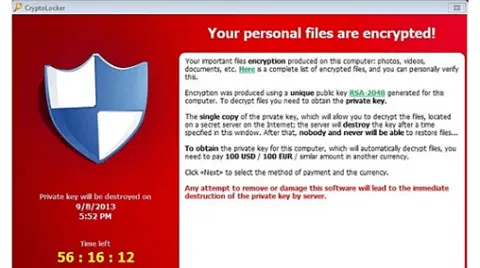
CryptoLocker was a ransomware first seen in September 2013: it encrypted the files on Windows computers and network drives, then demanded payment for the key. Taken down in 2014, its name lives on as a byword for ransomware, the most impactful threat in the EU according to ENISA.
What was CryptoLocker?
CryptoLocker encrypted each file with its own AES key, then locked that key with an RSA public key whose private half stayed on the attackers' servers. It also reached shared network drives and external disks, so one infected PC could block a company's management software.
Researchers counted 200,000 to 250,000 infections in its first 100 days, until an FBI-led operation with Europol seized its servers in May 2014.
How did CryptoLocker spread, and how does ransomware get in today?
CryptoLocker arrived by email: fake invoices or courier notices hiding an executable behind a double extension, such as invoice.pdf.exe. Phishing is still the main way in, in 60% of the intrusions ENISA analysed, ahead of exploited vulnerabilities. In Italy, CSIRT Italia reports attacks on SMEs through unpatched firewalls and compromised VPN credentials.
Today's ransomware also steals data before encrypting it, to threaten its release: a restore alone no longer closes the incident.
What can you do if ransomware has encrypted your files?
The response follows a documented procedure, such as CISA's #StopRansomware guide:
- Isolate the affected systems from the network, without wiping them.
- Report the incident, in Italy to CSIRT Italia and the Polizia Postale; with personal data involved, the GDPR gives 72 hours to notify the authority.
- Look for a decryptor on No More Ransom, the Europol and Dutch police project with free tools for many families.
- Restore from a clean backup, once the cause is removed.
Paying is not a solution: nothing guarantees you will receive the key.
Ransomware backup: the defence that still works
Without a copy out of reach, lost data rarely comes back. The rule is 3-2-1: three copies, on two media, one off-site, which CSIRT Italia wants offline or immutable.
Our cloud backup for business applies it with Acronis, managed by our systems engineers:
- Continuous data protection (CDP): the latest version of every file.
- Encryption in transit and at rest: we manage the jobs, not the contents.
- Immutable copies: no one can encrypt or delete them before the retention ends.
- Unlimited restores at no extra cost, with the copies kept in Italy, at the Acronis data center in Rome, or in the EU, as you choose.
Is a backup enough to stop ransomware?
No: the backup is the last line. Email filtering, updates, multi-factor authentication and endpoint protection (in Italian) come first, and our ransomware protection combines them. When an attack stops a whole site, you need disaster recovery, in Italian. For a single server, read how to secure a VPS in 5 steps.
Written by Rackone