


Open source
The Proxmox stack is licensed under GNU AGPLv3: inspectable code, no lock-in.
PROXMOX BACKUP SERVER
Proxmox Backup Server is the enterprise platform that protects Proxmox VE virtual machines and containers: incremental backup, deduplication, client-side encryption and granular restore. Official reseller and Gold Partner since 2021: subscriptions with invoicing from Italy.
Proxmox Backup Server 4 · free software (GNU AGPLv3) · subscription for stable updates and enterprise support
Why PBS
The Proxmox stack is licensed under GNU AGPLv3: inspectable code, no lock-in.
Written in Rust: fast and memory-safe, with no garbage collector.
Only what changes is transferred and stored, with block-level deduplication.
Very fast compression with high ratios, at several GB/s.
Authenticated client-side encryption: data stays protected even on the server.
PBS is added as storage in Proxmox VE to back up VMs and containers.
Efficiency
Backups travel incrementally from the client to the server, where the data is deduplicated: only what changes is transferred and stored, which reduces both storage use and network load.
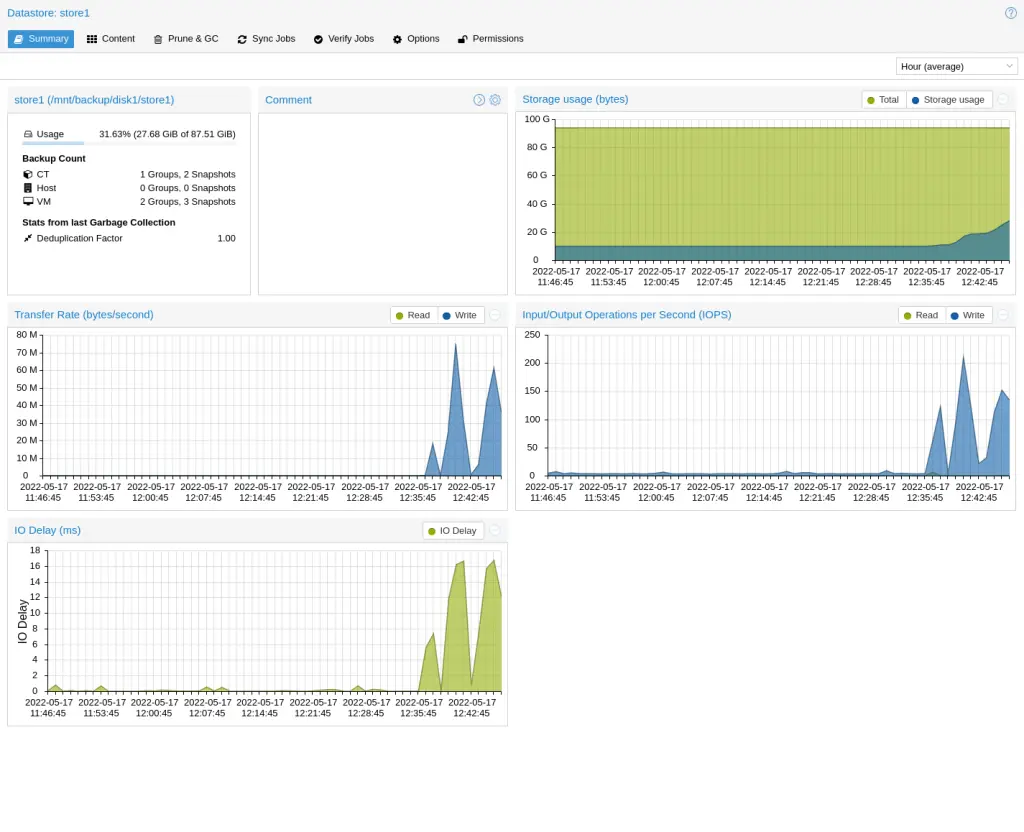
Each chunk is stored only once: two VMs running the same operating system share almost all of their blocks. How much space you save is measured by the datastore, not by a price list.
Source: Proxmox Backup Server, Technical OverviewIntegrity and security
Authenticated client-side encryption (GCM): the data is useless to anyone who gains access to the server.
Periodic verify jobs detect bit rot and confirm the integrity of every backup.
Granular access control, off-site copies through remote sync and tape copies for layered defence.
PAM realm, OpenID Connect and role-based access control: every user gets only the access they need.
Restore
Granular restore recovers a VM, an archive or a single file directly from the GUI. A snapshot catalogue for browsing, and an interactive shell to restore only what is needed.
Management and integration
A built-in web interface for datastores, tasks, logs, users and permissions. A RESTful API (JSON) for automation, and native integration with Proxmox VE, including LTO tape backup.
Off-site replication
Sync jobs replicate snapshots between PBS instances. The difference between pull and push is which side opens the connection, and therefore where the credentials live.
Both jobs are scheduled per datastore and namespace, with group filters, bandwidth limits and automatic removal of the snapshots that have disappeared from the source (remove-vanished). Pull and push together complete the 3-2-1 rule: a local copy, a second copy and an off-site copy.
Each subscription covers one PBS server, with unlimited backup storage and clients.
*Guaranteed first response time for critical requests, within the support coverage hours of each level; Premium support covers 24 hours a day from 19 October 2026. Proxmox Server Solutions GmbH price list, subject to change. Prices exclude VAT. Activation and invoicing through Rackone.
Managed PBS in the cloud
Activate a PBS datastore in the data centers of our Edge network in Italy, managed and monitored around the clock.
A Proxmox Backup Server subscription is priced per server, per year, at four levels (Community, Basic, Standard and Premium) set by the vendor's price list, VAT excluded. Every level covers one server with unlimited backup storage and clients, and the software itself is free.
Rackone's systems engineers activate the Proxmox Backup Server subscription key. For subscriptions bought from Rackone, reissues, upgrades and cancellations are also requested from Rackone.
No, a Proxmox Backup Server subscription bought from Rackone carries no multi-year commitment, and the backed-up data always remains yours.
Rackone's systems engineers provide support by ticket and email, in English or in Italian, with 24h options available on top of the vendor support included in the subscription level.
The choice between Proxmox Backup Server and Veeam depends on what you need to protect. PBS is the native Proxmox backup system: it is priced per server, not per machine, and it also protects LXC containers. The Veeam plug-in for Proxmox VE does not back up containers and requires a licence for every protected VM, but it manages Proxmox from the same console as VMware, Hyper-V and cloud environments, with cross-platform restore. In a Proxmox-only environment, PBS is usually the more straightforward choice; where several hypervisors coexist, or where Veeam is already in use, both are worth evaluating.
The choice between an on-premises PBS and a PBS managed in the cloud depends on your internal resources. With dedicated hardware, enough bandwidth and a systems engineer who looks after the infrastructure, an on-premises PBS remains faster for restoring large volumes, because the data does not cross the internet. A managed PBS removes the operational load (no hardware to size, no updates to follow) and provides a truly off-site copy from day one. In most of the projects we follow the two models coexist: an on-site PBS for everyday restores and a cloud datastore as the off-site copy.
Yes, Proxmox Backup Server is free: it is open source under the GNU AGPL v3 licence and runs with no licence fees, with incremental backups, deduplication, compression, client-side encryption and data verification. The subscription is optional, as it is for Proxmox VE: it is priced per server, with unlimited storage and clients, and it provides the enterprise repository and vendor support.
Backups of virtual machines on Proxmox VE are scheduled from the web interface, for a single VM or for the whole cluster. The built-in tool saves full copies to local disks, NFS or SMB; Proxmox Backup Server adds deduplicated incrementals, encryption, verification, synchronisation to a second site and tape. Always keep a copy outside the cluster: a snapshot is not a backup.
Yes, Veeam works with Proxmox VE: Veeam Backup & Replication protects it with a dedicated plug-in, with no agent inside the VMs, and also restores to Proxmox backups created on other platforms. It makes sense when Veeam is already in use or when several hypervisors coexist; LXC containers, however, are not covered. In an all-Proxmox environment, Proxmox Backup Server is usually more straightforward.
White-label subcontracting and pre-sales support: your brand stays at the centre, we operate behind the scenes.
partner@rackone.it · We never contact your end customers
An official subscription invoiced from Italy, or PBS managed in the cloud: you choose, we support you.
Leave us your details: a systems engineer gets back to you, not a salesperson.