

TOOLS · CEPH
Ceph calculator
Estimate how much data you can store in a Ceph cluster with 3 to 128 nodes so that, after the failures you want to survive and the recovery, no OSD goes above the nearfull threshold. It also sizes block.db, RAM and network and estimates recovery time, with formulas and sources shown in full.
Calculate your cluster
It starts from 3 nodes with four 3.84 TB NVMe drives each in 3-way replication: 13.97 TiB in theory, but to allow for the loss of one drive you can store 8.28 TiB, with 5% imbalance between OSDs and block.db on the same drives at 2%. With three nodes, the copies lost with a whole node cannot be rebuilt. Change the inputs to match your cluster.
- Releases
- Ceph Squid 19.2 and Tentacle 20.2
Beta This calculator is in beta. The results are estimates derived from the formulas and assumptions explained on this page: we provide them as is, with no guarantee that they are accurate, complete or suited to your case. Before buying hardware or putting a cluster into production, check the figures against the official documentation or with a systems engineer. To the extent permitted by law, we accept no liability for damages or costs resulting from decisions based on these calculations.
Calculate your cluster
Recommended capacity 8.28 TiB. Scenario: no failure. Data: Guaranteed. Warnings: 0.
Recommended logical capacity, NVMe drives, model estimate
8.28 TiB
Allows for the loss of one OSD: after recovery the fullest OSD reaches nearfull (85%) at most, in the ideal model. Worst failure: one OSD on node 1.
Model assumptions: ideal placement, with data spread in proportion to capacity and one copy or chunk per domain; imbalance between OSDs: 5%; block.db metadata on the same disk, assumed: 2%. Discrete PGs, weights and reweight move the real values: check them with ceph osd df tree and ceph df detail.
- Rebuild limit
- 8.78 TiB
- Computed on backfillfull after the loss of one OSD: above this value backfill stops and the rebuild does not complete.
- Theoretical full limit after the rebuild
- 9.28 TiB
- The value that would take the fullest OSD to full once the data has been rebuilt after the loss of one OSD. It is theoretical: backfill stops at backfillfull before getting there.
- Full limit with the cluster intact
- 12.37 TiB
- Above this value, with no failure at all, the fullest OSD exceeds full and Ceph blocks writes.
- Theoretical
- 13.97 TiB
- Raw divided by the number of copies, or by (k+m)/k with erasure coding.
- Raw
- 41.91 TiB
- 3 domains, 3 nodes.
No failures
Data transfer, two scenarios
cannot be estimated
Pick a failure to estimate the recovery.
Assumptions: bandwidth from mClock parameters or your own measurement, not a benchmark; peering, quorum, cluster state and client I/O make real times longer.
- Data you store
- 8.28 TiB, 19.8%
- Copies and parity
- 16.56 TiB, 39.5%
- Failure reserve
- 8.28 TiB, 19.8%
- Headroom before nearfull
- 7.94 TiB, 19.0%
- block.db on the same drive
- 0.84 TiB, 2.0%
Cluster map
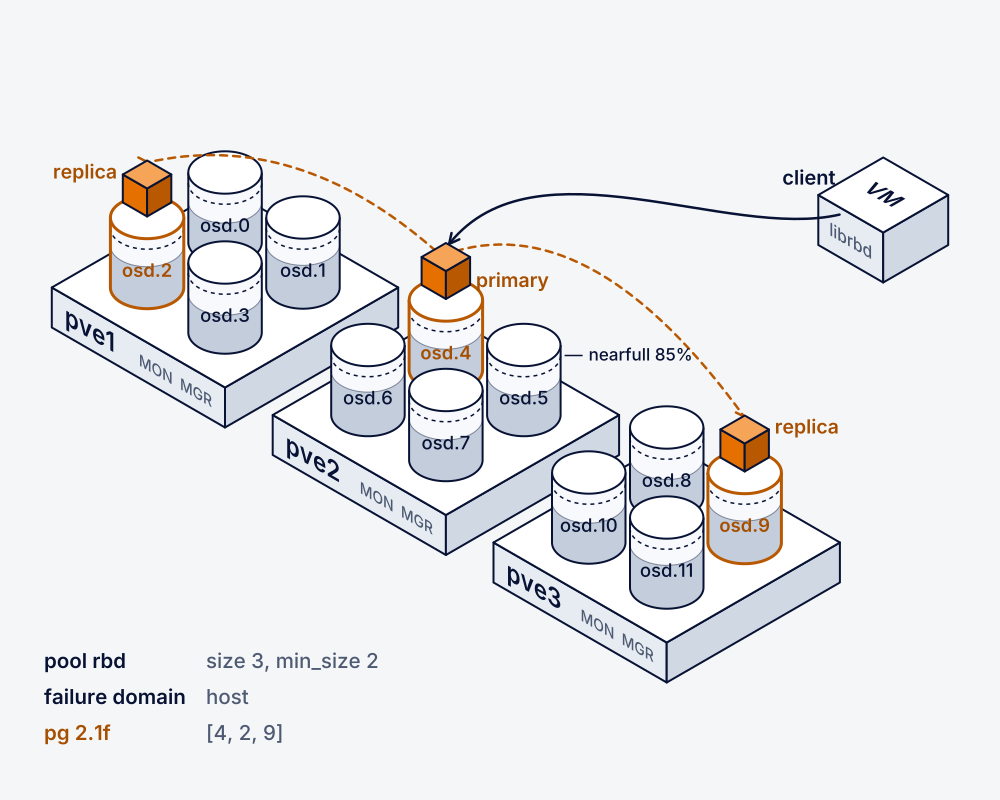
3 nodes, before the failurePress ‘Simulate failure’ on one or more nodes, or the number of an OSD to fail only that drive: outcomes, recovery and fill levels update.
nearfull fill level of the fullest OSD above nearfull failed
With a single data pool on NVMe and a target of 100 PGs per OSD you need 512 PGs; each OSD holds 128 PG instances on average, 128 at most with an ideal distribution, against a limit of 250. Calculate the PGs for every pool
To see this tab, pick a dedicated device in the block.db field of an HDD or SSD drive type: the rules side by side, how the OSDs map to the devices and a device failure simulation will appear.
What the numbers are: an official recommendation comes from the Ceph documentation of the release; general guidance does not distinguish the workload; a default is a configuration value; calculator choice and Rackone criterion are our own assumptions, and you can change them.
Not all of these are recommendations: the pveceph 10% is what it allocates when you give no size and Ceph has none configured, not a measure of what is needed.
The dark line is the value the calculator recommends.
How the OSDs of a node are assigned to the DB devices
How RocksDB grows: for understanding, not for sizing
Since Squid the RocksDB levels start at 1 GiB and each is 8 times the previous one: 1, 8, 64, 512 GiB. With use_some_extra BlueStore also uses the space between levels, so the old 3, 30 and 300 GB steps no longer hold as a rule.
SSD and NVMe: what actually speeds things up
- DB and WAL on NVMe
- metadata and small writes; not a cache for data
- Pools per class
- an NVMe pool for VMs, an HDD pool for cold data
- Primary affinity
- changes the likelihood that an OSD becomes the primary of a PG: it has to be configured, for example 0 on the HDDs to favor the SSDs, and it does not speed up the HDD copies that writes still wait for
- Cache tiering
- deprecated since Reef: do not use it in a new cluster
Group A: 3 nodes, each with 4 NVMe OSDs
- OSD memory targets
- 16 GiB
- osd_memory_target is a per-process target, not a cap nor the node RAM: for 4 OSDs it comes to 16 GiB with the 4 GiB default, 32 GiB with the 8 GiB that Proxmox VE recommends configuring.
- Physical RAM, 4 GiB target (Ceph default)
- 32 GiB
- Ceph rule: server RAM above 4 OSDs × 4 GiB × 2, that is 32.0 GiB, which already covers the OS and other daemons (the itemized sum, 30.2 GiB, is lower). Plus the VMs (0 GiB).
- Physical RAM, 8 GiB target (Proxmox VE advice)
- 64 GiB
- Ceph rule: server RAM above 4 OSDs × 8 GiB × 2, that is 64.0 GiB, which already covers the OS and other daemons (the itemized sum, 49.4 GiB, is lower). Plus the VMs (0 GiB).
- CPU threads for Ceph
- 19-27
- A starting point that depends on the workload: per OSD 1 to 3 threads on HDD and 4 to 6 on NVMe (Tentacle table), 2 to 4 on SATA SSD (a calculator assumption); plus 3 threads for the MON, MGR and MDS on the node and 0 for the VMs. Threads, not physical cores.
- Network
- 25 Gb/s or more
- Dedicated to Ceph, with Corosync on a separate network. Fast NVMe drives may need 40 or 100 Gb/s.
- Sequential bandwidth of a node's drives
- 5.0 GB/s
- Compare it with the 25 Gb/s network, which carries at most 3.1 GB/s. Which of the two limits a recovery is estimated in the Capacity and failures tab.
- Traffic between OSDs per byte written
- 2.00 times
- For every byte the client writes, the primary sends a copy to each other OSD in the PG: size minus 1 bytes of traffic.
Service budgets from the Ceph Tentacle hardware table: MON at least 5 GB, that is 4.66 GiB, rounded up to 5 GiB; MDS at least 8 GiB; MON and MDS at least 2 cores, counted as 2 threads. The table has no row for MGR: 2 GiB and 1 thread are a calculator assumption. The 20% on top of the targets is an indicative margin, not a node sizing. For disk bandwidth the calculator uses the mClock defaults, 150 MiB/s for HDDs and 1,200 MiB/s for SSD and NVMe: they are configuration parameters, not disk measurements.
Want a second opinion on this cluster? A summary of the calculation goes into your message: a Rackone systems engineer reviews it with you and proposes hardware and configuration.
Ask for a cluster designOn this page
How much usable space Ceph gives with 3-way replication
Dividing the raw capacity by three gives the theoretical space. The number that matters is a different one: how much data you can store so that, after the worst failure you want to survive and the recovery, the fullest OSD does not exceed the nearfull threshold (85% by default). The calculator calls it the recommended capacity and estimates it with ideal placement: data spreads across domains in proportion to capacity, with one copy or chunk per domain. The imbalance between OSDs is an explicit assumption, 5% by default, that you can change: it is not a Ceph guarantee. Discrete PGs, weights, reweight and object distribution move the real values, which you check with ceph osd df tree and ceph df detail.
L   = (threshold - block.db share) / (1 + imbalance)
a_d = capacity of domain d × L, in decreasing order
X*  = min over j from 0 to w-1 of S_j / (1 - j/w)
logical capacity = X* / amplification
L is the maximum fill allowed for an OSD, net of block.db and imbalance; a_d is the usable space of domain d; w is the number of copies with replication, or k+m with erasure coding; S_j is the sum of the a_d excluding the j largest domains; the amplification is size with replication and (k+m)/k with erasure coding. A domain cannot hold more than X*/w, because every object has at most one copy or chunk per domain: this constraint is where both the space stranded by domains of different capacity and the failure reserve come from.
Worked example: 3 nodes with 4 OSDs of 3.84 TB, 3-way replication, host failure domain, block.db on a dedicated device. Raw capacity is 46.08 TB, or 41.91 TiB, and the theoretical capacity 13.97 TiB. With three nodes, the copies lost with a node cannot be rebuilt, because a fourth domain would be needed: the failure to survive therefore becomes the loss of one OSD. That OSD's data is rebuilt on the other three OSDs of the same node, whose usage grows by a third; to keep them below 85% you can store 8.91 TiB with no imbalance, 8.48 TiB with 5%.
Next to the recommended capacity the calculator shows three more values, all in the ideal model. The rebuild limit, based on the backfillfull threshold (90%) after the failure to survive: above it, backfill stops and the rebuild does not complete. The theoretical full limit after the rebuild, based on the full threshold (95%) after the same failure: it is theoretical, because backfill stops earlier, at backfillfull. The full limit with the cluster intact: above it, with no failure at all, the fullest OSD exceeds full and Ceph blocks writes. In the starting case, with 5% imbalance and block.db on the same drives at 2%, the two full limits are 10.20 TB after the rebuild and 13.60 TB with the cluster intact. A value equal to the threshold reaches it and leaves no extra margin.
Replication or erasure coding
3-way replication keeps three full copies of every object: amplification 3, min_size 2, reads from a single copy. Erasure coding k+m splits every object into k data chunks and m parity chunks: the amplification drops to (k+m)/k, that is 1.5 for a 4+2, at the cost of more CPU and more latency. To use an EC pool with RBD or CephFS you need allow_ec_overwrites, which enables partial writes, and the metadata stays on a replicated pool: RBD images are created in the replicated pool with their data on the EC pool (--data-pool), and CephFS keeps the metadata pool and the default data pool replicated, then adds the EC pool.
min_size is a field of the calculator. With replication it starts at 2; with 2-way replication, min_size 2 stops I/O on the affected PGs at the first failure, and min_size 1 is left as an advanced, risky choice, because it accepts writes on a single copy. With erasure coding it starts at k+1, as the documentation recommends, and min_size equal to k is an advanced, risky choice. The documentation strongly discourages m = 1 in production and advises caution with k above 4 or m above 2: the warnings appear next to the results, with the same judgments as the PG calculator.
You need at least k+m domains, and the Ceph documentation advises one more so that the pool can be rebuilt after a failure. With EC 4+2 on 6 hosts, losing a host leaves the data readable, but the lost chunks cannot be rebuilt; on 7 hosts they can.
Worked example: 7 nodes with 4 HDDs of 16 TB, the loss of one node to survive, no imbalance between OSDs and block.db on the same drives at 2% (the default). With 3-way replication you can store 96.62 TiB, with EC 4+2 193.25 TiB: twice as much, on the same drives.
What happens when a node fails
For every failure the calculator answers three separate questions. Is the data protected? Yes if the failure hits fewer domains than there are copies (with replication) or at most m domains (with erasure coding); beyond that it depends on how the PGs are placed, and the calculator says ‘not guaranteed’. Does the cluster stay available? Reads and writes continue if every PG keeps at least min_size copies or chunks and the remaining OSDs stay below full; MON quorum and completed peering are needed too, and the calculator does not simulate them. If the fullest OSD exceeds full, Ceph raises OSD_FULL and blocks writes even with every copy in place: the calculator says so, and flags existing data that already exceeds full with the cluster intact as incompatible with the model. Is redundancy rebuilt? Only if at least w domains remain and, after recovery, the fullest OSD stays within backfillfull, so that backfill can complete.
The worst failure, the one that sets the recommended capacity, is found by searching every combination of the failures to survive, not just by removing the largest node: with domains of different capacity the worst case can be a different one.
With 3 nodes and 3-way replication, after losing a node the data keeps two copies and I/O continues thanks to min_size 2, but the third copy is not rebuilt until the node comes back. Ceph does not rebuild straight away anyway: with the default parameters it detects an unresponsive OSD with a grace of about 20 seconds (osd_heartbeat_grace) and marks it out after a base interval of 10 minutes (mon_osd_down_out_interval). Both are configurable, Ceph adapts them to the cluster state and the noout flag suspends marking out. The OSDs of a CRUSH bucket of type rack that is entirely down are not marked out automatically (mon_osd_down_out_subtree_limit defaults to rack): in that case you start the recovery yourself, provided the nodes really sit in rack buckets in the CRUSH map.
How big block.db and WAL should be
With OSDs on HDDs, block.db on NVMe speeds up metadata and small writes. The published rules do not agree:
| Rule | Nature | RBD | CephFS | RGW |
|---|---|---|---|---|
| Ceph Squid and Tentacle | official recommendation for RBD and RGW, general guidance for other workloads | 1-2% | 1-4%, general guidance | at least 4% |
| Ceph, development docs | recommendation in the development release | at least 2.5% | at least 2.5% | at least 2.5% |
| Red Hat Ceph Storage 8 | vendor recommendation | 1% | 4% | 4% |
| pveceph with no size given | allocation default | 10% | 10% | 10% |
The pveceph 10% is what it allocates when you give no size and Ceph has none configured: it does not measure the need. For the dedicated DB device the calculator recommends 2% for RBD, the top of the recommended 1-2%; 4% for RGW, the recommended minimum; 4% for CephFS and mixed workloads, the top of the general 1-4% guidance, which the documentation does not tie to CephFS: for these workloads it is the calculator's own choice. The development documentation asks for at least 2.5%, and to follow it you only need to add a margin in the DB/WAL tab. With block.db on the same drive, instead, the percentage is an assumption about metadata usage, which counts towards OSD fill.
Worked example: with 12 OSDs of 16 TB per node and an RBD workload, 2% gives 320 GB of block.db per OSD, 3.84 TB per node before any margin. A 3.84 TB NVMe drive would be enough only if all of its capacity were allocatable. The Ceph Tentacle hardware table allows up to 15 HDD OSDs per NVMe, with no PCIe requirement; the calculator uses a conservative Rackone criterion of 10 OSDs per NVMe, so it flags 12 OSDs on one device. The capacity, latency, IOPS and endurance of the device need checking, as does the impact of its failure: if a device fails, every OSD it serves stops with it, with one device that is all 12 OSDs of the node, with two devices 6. The DB/WAL tab of the calculator simulates exactly that failure.
The WAL sits on the DB device and uses its space, so it must not be counted twice; a separate WAL only makes sense on a device faster than the DB one. In that case it is an allocation on another device: the calculator estimates its space, 2 GiB per OSD as an assumption you can change, and does not take it from the DB device. The RocksDB levels (1, 8, 64 and 512 GiB, with use_some_extra) explain how the DB grows but are not sizing steps: the old 3, 30 and 300 GB values no longer hold as a rule. When block.db fills up, the excess metadata spills over to the slow drive and Ceph raises BLUEFS_SPILLOVER.
SSD and NVMe: what actually speeds things up
- DB and WAL on NVMe: they speed up metadata and small writes; they are not a cache for data.
- Pools per device class: an NVMe pool for VM disks and an HDD pool for backups and cold data; each pool uses only its own class, and the calculator treats them separately.
- Primary affinity: it changes the likelihood that an OSD becomes the primary of a PG. It has to be configured, for example 0 on the HDDs to favor the SSDs in mixed pools; it does not recognize SSDs on its own and does not speed up the HDD copies that writes still wait for.
- Cache tiering: deprecated since Ceph Reef, because it has long had no maintainer and may be removed; better not to use it in a new cluster.
RAM, CPU and network per node
The starting point for RAM is osd_memory_target, 4 GiB per OSD by default: it is a per-process target, not a cap nor the node RAM. The Ceph documentation recommends server RAM above number of OSDs × target × 2, room that already covers the OS and the other daemons; Proxmox VE recommends configuring a target of at least 8 GiB per OSD. The calculator applies the Ceph rule to both targets and, if the declared services and OS exceed it, uses the itemized sum with an indicative 20% margin; VMs come on top. With 12 OSDs per node that is 96 GiB with the 4 GiB target and 192 GiB with the 8 GiB one, VMs excluded. For the services the Ceph Tentacle table gives at least 5 GB for a MON and 8 GiB for an MDS, with at least 2 cores each; it has no row for MGR, and the calculator counts 2 GiB. These budgets can be changed.
For CPU the calculator takes 1 to 3 threads per OSD on HDD and 4 to 6 on NVMe, from the Tentacle table, and 2 to 4 on SATA SSD, a calculator assumption, as a starting point; plus 2 threads per MON and per MDS, 1 per MGR, and the VM threads. The real workload moves these numbers. These are threads, not physical cores.
Proxmox VE recommends at least 10 Gb/s dedicated to Ceph, 25 Gb/s or more with NVMe drives, and 40 or 100 Gb/s to make the most of fast NVMe, with Corosync on a separate network. Every GB a client writes generates more GB of traffic between OSDs: size minus 1 with replication, (k+m-1)/k with erasure coding for full writes, that is 2 GB with 3-way replication and 1.25 GB with EC 4+2. Partial erasure-coded writes can generate more.
How long recovery takes
The transfer time is the longest of four times, one for each possible bottleneck: the drives receiving the data, the network of the nodes receiving it, the surviving drives (which read and write at the same time) and the cluster network as a whole.
time = max( received by the busiest OSD / OSD bandwidth,
            received by the busiest node / network bandwidth,
            V × (read factor + 1) / (surviving OSDs × OSD bandwidth),
            V × network factor / (surviving nodes × network bandwidth) )
V is the volume to rebuild; the factors are 1 with replication and k with erasure coding, because the primary reads k chunks to rebuild one. As the bandwidth of an OSD the calculator uses the mClock defaults (osd_mclock_max_sequential_bandwidth_hdd and _ssd): 150 MiB/s for HDDs, 1,200 MiB/s for SSDs and NVMe. They are configuration settings, not drive measurements: you can enter your own measurement in the advanced settings. The conservative scenario uses half of that bandwidth with the network at 50%, the optimistic one all of it with the network at 90%. They are two transfer scenarios, not a guaranteed range for getting back to active+clean: peering, quorum, cluster state and client I/O make real times longer.
Worked example: 5 nodes with 6 NVMe drives of 7.68 TB and a 25 Gb/s network, the cluster filled up to the recommended capacity, no imbalance between OSDs, block.db on the same drives at 2% and the loss of one node. There are 30.6 TB to rebuild: in the two scenarios the transfer takes between 45 and 82 minutes, and the bottleneck is the network. Failure detection and, with the default parameters, the 10-minute base interval before the OSDs are marked out come before the transfer.
How we calculate: formulas and sources
Model 1.3.0, dated 28 October 2026, for Ceph Squid 19.2 and Tentacle 20.2; Proxmox VE 9.2 installs Tentacle 20.2.1 by default. Compared with version 1.2.0 of 19 October it separates availability from writes beyond full, distinguishes the two full limits and makes min_size, the separate WAL and the service budgets explicit. The calculator engine is checked against an independent reference implementation on 23 capacity cases from 3 to 128 nodes, failure scenarios, recovery estimates, PGs and block.db, and the worst-failure search against an enumeration of every combination.
Left out of version 1: several protection schemes on the same drive class, pools spanning classes, custom CRUSH rules beyond OSD, host and rack, stretch clusters, compression, small-object amplification and client performance.
- Ceph, pools, size and min_size
- Ceph, erasure coding
- Ceph, nearfull, backfillfull and full thresholds
- Ceph, when an OSD is marked out
- Ceph, BlueStore and block.db (Tentacle)
- Red Hat Ceph Storage 8, BlueStore
- Ceph, hardware recommendations (Tentacle)
- Ceph, mClock and sequential bandwidth
- Ceph, cache tiering deprecation
- Proxmox VE, hyper-converged Ceph
- Ceph, OSD_FULL and the other health checks
- Ceph, primary affinity
Designing a Proxmox cluster with Ceph?
We design clusters from 3 nodes upwards: drives, network, block.db and protection sized for your workload, with failure testing before production.
Ceph calculator FAQ
How much usable space does Ceph give with 3-way replication?
With 3-way replication the theoretical capacity is a third of the raw capacity, but to survive a failure while staying below the 85% nearfull threshold you can store less. Three nodes with 4 x 3.84 TB, allowing for the loss of one OSD, give about 8.9 TiB out of 41.9 TiB raw; five nodes with 6 x 7.68 TB, allowing for the loss of one node, about 47.5 TiB out of 209.5 TiB. Both values assume no imbalance between OSDs and block.db on a dedicated device.
How many nodes does Ceph need on Proxmox?
For Ceph on Proxmox VE the practical minimum is 3 nodes, and the Proxmox documentation recommends at least 12 OSDs spread across them. With 3 nodes and 3-way replication, though, after losing a node the third copy is not rebuilt until the node comes back: to get back to three copies on the remaining nodes you need at least 4 nodes.
What does min_size 2 do, and why not min_size 1?
In Ceph min_size is the minimum number of copies with which a placement group still accepts reads and writes. With size 3, min_size 2 and a host failure domain, the cluster keeps working after losing a node, once peering completes. With min_size 1 it accepts writes on a single copy, and the Ceph documentation warns that in production this risks data loss. With 2-way replication, min_size 2 protects the data but stops I/O on the affected PGs at the first failure.
Erasure coding or replication: when is EC worth it?
Erasure coding pays off for large, rarely modified data such as backups, archives and object storage: an EC 4+2 pool takes 1.5 times the data instead of 3. It costs CPU and latency, and it needs at least k+m domains, better k+m+1: at least 6 nodes for a 4+2, 7 to rebuild after a failure. VM disks usually stay on 3-way replication.
How big should block.db be for an HDD OSD?
For an OSD on HDD the Ceph Squid and Tentacle documentation suggests a block.db of 1 to 2% of the OSD size for RBD and at least 4% for RGW; the development docs say at least 2.5%. On a 16 TB drive that is 160-320 GB for RBD: the calculator recommends 2%, or 320 GB, and you can add a margin.
Do I need a separate WAL in Ceph?
Usually not: in Ceph the WAL sits on the block.db device and is part of its space. Separating it only makes sense on a device faster than the DB one, and then it takes space on that device, not on the DB device: the calculator counts 2 GiB per OSD, an assumption you can change.
How much RAM does a Ceph OSD need?
The osd_memory_target default is 4 GiB per OSD, but it is a per-process target, not the RAM to plan for: the Ceph documentation recommends server RAM above number of OSDs × target × 2, which covers the OS and other daemons, and Proxmox VE recommends configuring a target of at least 8 GiB. With 12 OSDs per node that is 96 GiB with the 4 GiB target and 192 GiB with the 8 GiB one; VMs come on top.
What network does Ceph need, 10 or 25 Gb/s?
Ceph needs at least 10 Gb/s of dedicated network; with NVMe drives Proxmox VE recommends at least 25 Gb/s, and very fast drives may need 40 or 100 Gb/s. In a recovery the network is often the bottleneck: six NVMe drives in a node read more data than a 25 Gb/s network can carry.
What are nearfull, backfillfull and full in Ceph?
They are the three Ceph OSD fill thresholds, 85%, 90% and 95% by default. At nearfull Ceph warns; at backfillfull it refuses backfill to that OSD, so rebuilding data onto it stops; at full it raises OSD_FULL and blocks writes. The calculator sizes on nearfull after the failure, and shows separately the full limit with the cluster intact and the theoretical one after the rebuild.
Can I still use Ceph cache tiering?
It still works, but it has been deprecated since Ceph Reef: it has long had no maintainer and may be removed without much notice, so it is better not to use it in a new cluster. To speed up an HDD cluster, put block.db and WAL on NVMe or split the pools by device class.
What happens if I lose a node in a 3-node Ceph cluster?
In a 3-node Ceph cluster with 3-way replication the data keeps two copies and I/O continues with min_size 2, but the third copy is not rebuilt until the node comes back: there is no fourth node to put it on. If a second node fails in that window, a single copy is left and, with min_size 2, I/O stops.
Do I need Ceph for a Proxmox cluster, or is ZFS replication enough?
Ceph is not mandatory for a Proxmox cluster. ZFS replication copies VM disks between nodes at intervals, every 15 minutes by default, so if a node fails and you restart its VMs from the replica, you lose the changes made since the last replication; Ceph writes every piece of data to several nodes synchronously. Ceph needs at least 3 nodes, a fast network and more drives: for 2 or 3 nodes with a few VMs, ZFS replication can be enough.
Is Ceph deprecated?
No: Ceph is actively developed, and Proxmox VE 9.2 installs the Tentacle 20.2 release by default. What is deprecated is cache tiering, a Ceph feature, not Ceph itself.

- 700+ active customers
- 24h support, every day
- GDPR data kept in Italy
We design your Ceph cluster
We size drives, network, block.db and protection for your workload and, before production, test how the cluster reacts to failures.
+39 0421 1885889 · sales@rackone.it