Proxmox
Proxmox Ceph: how to install and configure Ceph on Proxmox VE
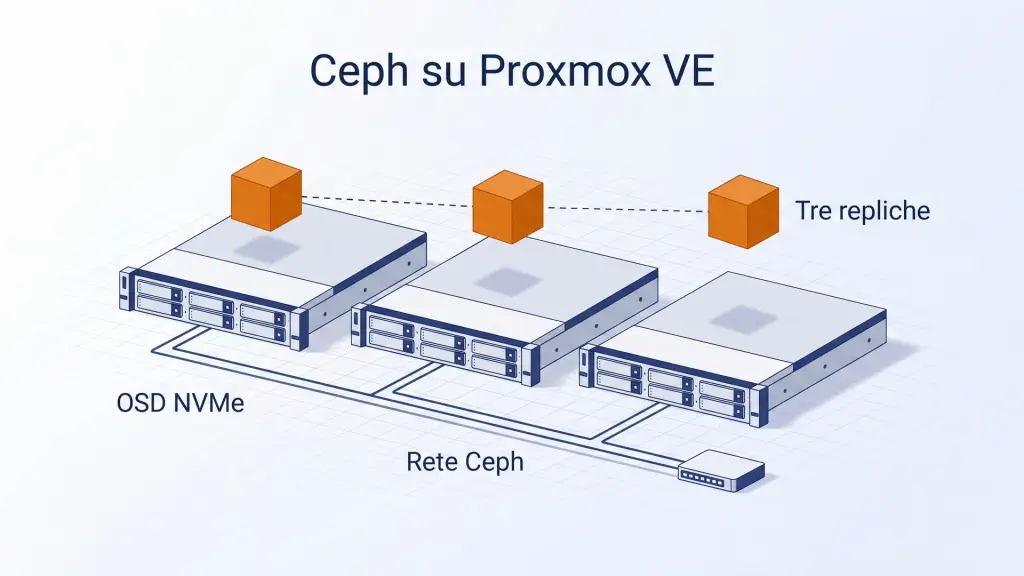
Proxmox Ceph is the open-source Ceph storage built into Proxmox VE: node disks become one shared, replicated pool, with no SAN. It needs at least three nodes, a dedicated network of 10 Gbps or more and enterprise disks, preferably SSD or NVMe, on an HBA. You install it with pveceph, then create monitors, OSDs and a three-replica pool.
Rackone · 16 min read
In this article
What is Proxmox Ceph and when does it make sense?
Proxmox Ceph is Ceph, the open-source distributed storage system that Proxmox Virtual Environment (Proxmox VE) installs and manages directly on the cluster nodes: every server runs virtual machines and contributes its disks to one shared, replicated pool. This is the hyper-converged architecture described in the Proxmox VE guide. It removes the need for a SAN, and you manage it from the same Proxmox VE web interface and with the pveceph command.
Shared storage means a live migration does not copy the disks, and high availability restarts a virtual machine on another node with up-to-date data. The built-in ZFS replication, the alternative without shared storage, copies disks at intervals. According to the storage replication documentation, with high availability a node failure can cost you the writes made since the last replication run.
Ceph needs at least three servers, a dedicated network and suitable disks. For a site with two servers, ZFS replication with a QDevice is the usual choice, and the Proxmox cluster guide covers it. Sizing and a comparison with Nutanix and vSAN are on the page about Proxmox hyper-converged infrastructure (in Italian).
How many nodes and OSDs do you need?
A Proxmox VE cluster with Ceph needs at least three servers, preferably identical, and the guide recommends at least 12 OSDs spread evenly across them. An OSD (Object Storage Daemon) is the service that manages one disk, and the guide advises one OSD per physical disk.
Monitors hold the cluster map and form the Ceph quorum. You need at least three, and for a small or medium cluster three are enough. The manager runs on the same nodes as the monitors and handles functions such as placement group autoscaling and disk health monitoring. One manager is active at a time, and a second stays on standby.
On three nodes, a three-replica pool has no fourth host on which to rebuild the copy of an offline node, so the data stays at two copies until the node returns. This happens because, with the host failure domain normally used, each replica of an object is stored on a different host, as the Ceph documentation on CRUSH maps explains. From four nodes upwards, Ceph can rebuild the third copy on the remaining nodes, provided there is free space.
The Rackone service
Proxmox partner in Italy: Gold Partner #1What network does Ceph need on Proxmox VE?
The Ceph network must be dedicated and fast: the Proxmox VE guide recommends at least 10 Gbps reserved for Ceph traffic and, with NVMe disks, at least 25 Gbps, because a single NVMe drive can saturate a 10 Gbps link. For clusters of three to five nodes without 10 Gbps switches, the guide also allows a full mesh network, with the nodes cabled directly to each other. The linked procedure describes three nodes and recommends switches for larger clusters or clusters meant to grow.
Keep Ceph traffic off the Corosync network. The guide warns that Ceph recovery traffic interferes with Corosync, the latency-sensitive cluster communication layer of Proxmox VE, and can cost the cluster its quorum. For high-performance installations it recommends three physical networks:
- one network of 25 Gbps or more for Ceph's internal (cluster) traffic;
- one of 10 Gbps or more connecting Ceph services and clients, which can also carry virtual machine and migration traffic;
- one of 1 Gbps reserved for Corosync.
In the Ceph configuration the public network is mandatory and carries traffic between Ceph services and clients, for example virtual machines with RBD disks. The cluster network is optional: it isolates OSD replication and heartbeat traffic, and you can move it to another physical network even after installation. According to the Proxmox VE 9.0 release notes (August 2025), SDN fabrics can also configure the full mesh network of a Ceph cluster.
What hardware does Proxmox Ceph need?
Proxmox Ceph needs enterprise disks connected without RAID, at least one core per Ceph service and memory reserved for the OSDs. The values below come from the Proxmox VE guide and the Ceph hardware recommendations: adapt them to the workload of your cluster.
- Disks: the Ceph documentation recommends enterprise-class SSDs with power loss protection (PLP), because consumer SSDs slow down sharply once the cache fills, after an initial peak. The Proxmox VE guide advises identical disks, in equal numbers on every node, for example four 500 GB disks instead of one 1 TB disk plus three 250 GB disks, and prefers SSDs in small clusters because they shorten recovery after a failure.
- No RAID: Ceph handles redundancy and parallel disk writes itself and, in the guide's words, a RAID controller does not improve performance or availability and sometimes makes them worse. Use an HBA (host bus adapter) instead, which exposes the disks directly to Ceph.
- CPU: the Proxmox VE documentation's rule of thumb is at least one core or thread per Ceph service, so a node with one monitor, one manager and six OSDs reserves 8 cores for Ceph alone. An OSD on a very fast NVMe disk can use four to six threads.
- Memory: the default
osd_memory_targetis 4 GiB, a target and not a hard limit, but the guide recommends at least 8 GiB for good performance. Consumption grows during recovery and rebalancing, so do not saturate node RAM in normal operation. Raise the value for all OSDs withceph config set osd osd_memory_target 8G.
Which Ceph version does Proxmox VE 9 install?
Proxmox VE 9.2 installs Ceph Tentacle 20.2 on nodes that do not have Ceph yet, while existing clusters stay on the release they already run, as the Proxmox VE release notes of 21 May 2026 report. Proxmox VE 9.0 and 9.1 include Ceph Squid 19.2.3.
| Proxmox VE | Released | Ceph in the release notes | Offered on new installations |
|---|---|---|---|
| 9.0 | 5 August 2025 | Squid 19.2.3 | Squid |
| 9.1 | 19 November 2025 | Squid 19.2.3 | Squid |
| 9.2 | 21 May 2026 | Squid 19.2.3 and Tentacle 20.2.1 | Tentacle |
For a new cluster use Tentacle, the default release in Proxmox VE 9.2 (--version tentacle). Squid can still be selected with --version squid, but Ceph Squid's maintenance by the Ceph project ended on 31 October 2026, so clusters still on Squid should move to Tentacle. On a cluster that already has Ceph, the wizard offers the release in use; on a cluster without Ceph it offers Tentacle.
Upgrading a production cluster from Squid to Tentacle follows the official Ceph Squid to Tentacle guide. Start from an up-to-date Proxmox VE 9.2, a healthy cluster and Ceph Squid 19.2.3-pve3 or later, and set the noout flag. After upgrading the packages on all nodes, restart the monitors first, one at a time, then the managers, then the OSDs, one host at a time. For CephFS, follow the dedicated MDS procedure. Then verify the running versions, run ceph osd require-osd-release tentacle and remove the noout flag. The migration of CephX keys is a separate procedure.
How do you install Ceph on Proxmox VE?
You install Ceph on Proxmox VE by running pveceph install on every node of an existing cluster, then creating the configuration, three monitors (Proxmox VE creates the first manager with the first monitor), a standby manager and the OSDs. Start from a cluster with the same Proxmox VE version on all nodes and the Ceph network configured; the Proxmox cluster guide describes how to create it. The commands follow the Proxmox VE 9.2 guide and the pveceph manual page as of October 2026: check the guide for the release you install before applying them.
Install the Ceph packages on every node. The
enterpriserepository, the default, is the one Proxmox recommends for production and requires a subscription. Theno-subscriptionrepository is free and meant for testing and non-production environments. Themanualoption leaves the repositories as they are, so you must first configure one that provides the Ceph packages, for example an internal mirror.# on every node pveceph install # without a subscription pveceph install --repository no-subscriptionCreate the initial configuration on one node only, with the public network and, if you have one, the cluster network. The cluster file system, pmxcfs, replicates the
/etc/pve/ceph.conffile to all nodes.pveceph init --network 10.10.10.0/24 --cluster-network 10.10.20.0/24Create a monitor on each of the three nodes. When you create the first monitor, Proxmox VE also creates the first manager.
# on three nodes
pveceph mon create
Add a manager on another node that has a monitor, as a standby.
pveceph mgr createCreate one OSD for each disk dedicated to Ceph, on every node. If a disk has already been used for ZFS or as an OSD, wipe it first: the wipe command erases all its data.
# only for a disk that was already used
ceph-volume lvm zap /dev/sd[X] --destroy
pveceph osd create /dev/sd[X]
Create the pool and the storage for the virtual machine disks, as in the next section.
In the web interface the sequence is the same: in the Ceph section of the node, the wizard installs the packages and configures the public network, the cluster network and the first monitor. Then you use the Ceph → Monitor, Ceph → OSD and Ceph → Pools panels.
If your OSDs sit on slow disks, move the OSDs' BlueStore DB and write-ahead log (WAL) to a faster SSD or NVMe with the -db_dev option of pveceph osd create. Without explicit sizes, Proxmox VE uses the bluestore_block_db_size and bluestore_block_wal_size values already set in Ceph and, if they are missing, assigns 10% of the OSD size to the DB and 1% to a separate WAL. -db_dev on its own keeps the WAL on the DB device. A fast disk shared by too many OSDs becomes the bottleneck for all of them.
How do you create the pool and the RBD storage?
You create the pool with pveceph pool create <name> --add_storages, which also adds it to Proxmox VE as RBD storage. A pool is the logical group in which Ceph stores objects, and the RBD storage holds the disks of virtual machines and containers. The Proxmox VE guide describes a default pool of 128 placement groups, size 3 and min_size 2: three copies of every object, with I/O continuing as long as at least two remain.
pveceph pool create vm-ceph --add_storages
Keep the --add_storages option: the pveceph manual page sets it to off by default for replicated pools, whereas in the web interface the Add as Storage checkbox is already ticked. Without the option the pool exists but is not added to the Proxmox VE storage list, and you must add it from Datacenter → Storage with the RBD type.
Do not set min_size 1: the guide rules it out explicitly, because a pool that accepts writes with a single copy can lose data or leave objects unfound. The placement group autoscaler is initially set to warn mode, which reports a non-optimal number of placement groups without changing it. The Target Ratio and Target Size parameters guide the calculation of the optimal number. The pg_num for each pool, or the settings to give the autoscaler, can be worked out with the Ceph PG calculator.
CephFS for ISO images, templates and backups
CephFS is the Ceph file system, and Proxmox VE uses it as shared storage for backups, ISO images and container templates. It needs monitors, OSDs and at least one Metadata Server (MDS). The guide reports that pveceph fs create creates a data pool with 128 placement groups and a metadata pool with a quarter of that number, and adds the storage to the cluster.
pveceph mds create
pveceph fs create --pg_num 128 --add-storage
By default only one Metadata Server is active: the other MDS daemons stay on standby and take over if the active one becomes unavailable.
How much usable space do three replicas leave?
At size 3, the usable space of a Ceph pool is one third of the raw space, and the OSD fullness thresholds apply before that third is used up. According to the Ceph documentation, an OSD is nearfull at 85% usage, stops accepting backfill at 90% and is full at 95%: at that point Ceph blocks writes and the services that depend on the storage can stop. Run ceph osd dump to see your cluster's actual thresholds.
An example with those values: three nodes with 10 TB raw each give 30 TB raw, 10 TB usable with three copies and about 8.5 TB before the nearfull threshold, if the OSDs fill evenly. The Ceph documentation advises also subtracting the space of the OSDs you expect to lose together, because after a failure Ceph rebuilds the replicas on the remaining OSDs. The Ceph calculator runs this calculation for your cluster, accounting for the worst-case failure, the three thresholds and block.db space.
Check the usage of each OSD with ceph osd df tree, or in the Ceph → OSD panel, in the Used (%) column. Before removing an OSD, verify that the usage of all OSDs is well below the nearfull threshold, as the Proxmox VE guide prescribes, because the rebalancing that follows can fill them.
How do you check that Ceph is healthy?
The ceph -s command shows the state of Ceph: a healthy cluster reports HEALTH_OK, while on HEALTH_WARN or HEALTH_ERR it lists the problems and any operations in progress. The same view is in the Ceph panel of every node.
ceph -s
ceph osd df tree
ss -tulpn | grep ceph
The ss command, which the guide uses after a network change, shows the addresses on which the Ceph services listen. Use it to confirm that the public network and the cluster network are the ones you intended.
Common Ceph errors on Proxmox VE
According to the Proxmox VE guide, the most common Ceph problems come from the network (congestion, faulty switches, firewalls blocking Ceph traffic), from faulty or slow disks under load, and from hardware that does not meet the recommendations. Find your symptom in the table: cause and fix come from the guide and the Ceph documentation.
| Symptom | Cause | Fix |
|---|---|---|
| High latency on VM disks during recovery, sometimes loss of cluster quorum | Ceph traffic on the same network as Corosync or the VMs | dedicated Ceph network, Corosync on its own network |
| The disk cannot be used for an OSD | leftover metadata from ZFS or from a previous OSD | ceph-volume lvm zap /dev/sd[X] --destroy, which erases all data on the disk |
| The pool created on the command line is not added to the Proxmox VE storage list | --add_storages is false for replicated pools | do not delete or recreate the pool: add the existing pool from Datacenter → Storage → Add → RBD, or with pvesm add rbd vm-ceph --pool vm-ceph --content images,rootdir |
| HEALTH_WARN with OSD nearfull | OSD above the nearfull threshold | add OSDs or free space before the full threshold |
| I/O blocked on some placement groups | fewer copies available than min_size, for example OSDs restarted on several hosts together | restart OSDs one host at a time and wait for HEALTH_OK |
| OSD down | faulty disk or link, network problems | check logs, disk state, links and network; if the LVM OSDs exist but are inactive, try ceph-volume lvm activate --all on the node; reboot the node only if it is safe for the cluster, and recreate or replace the OSD only when it is certain that you need to |
| HEALTH_ERR with AUTH_INSECURE_SERVICE_KEY_TYPE after an upgrade | health checks on CephX keys that use aes, new in Squid 19.2.6 and Tentacle 20.2.4 | migration to aes256k with the Proxmox VE tool |
AUTH_INSECURE_SERVICE_KEY_TYPE comes from health checks, new in Squid 19.2.6 and Tentacle 20.2.4, that flag CephX keys using the aes cipher. Both releases came out on 19 August 2026 to fix CVE-2025-30156, an authentication bypass in CephX (Ceph project announcement). Two of the checks put the cluster in HEALTH_ERR even though the storage works, as the Proxmox VE guide warns.
To migrate to the aes256k key type you need pve-manager 9.2.19 or later and the pve-cephx-rotate-service-keys tool, which first shows the plan and then applies it with --apply. The two commands below migrate only the cluster service keys. First upgrade all nodes, complete the rolling service restarts and resolve any other errors. Then run the tool as root from a single node, with no other maintenance in progress.
To complete the migration, check the compatibility of all clients, rotate their keys, refresh their sessions and only at the end restrict the ciphers, following the official guide. Rebooting the operating system inside a virtual machine does not update the key that QEMU uses.
# plan, no changes
/usr/share/pve-manager/migrations/pve-cephx-rotate-service-keys --rotate-cluster-keys
# apply
/usr/share/pve-manager/migrations/pve-cephx-rotate-service-keys --rotate-cluster-keys --apply
How do you shut down a Proxmox VE cluster with Ceph?
Before shutting down a Proxmox VE cluster with Ceph, stop all clients and set the noout flag, so that powered-off OSDs are not marked out and Ceph does not redistribute data while the nodes go down and come back. The Proxmox VE guide sets out this procedure:
- Stop virtual machines, containers and every other Ceph client, such as CephFS mounts.
- Check with
ceph -sthat the cluster is healthy. - Set the noout flag with
ceph osd set noout, so that Ceph does not redistribute the data of powered-off OSDs. - Shut down the nodes without monitors first, then those with monitors.
- When powering on, start the nodes with monitors first. When all Ceph services are active and the only remaining warning is about
noout, remove the flag withceph osd unset nooutand start the virtual machines.
HA-managed VMs that Proxmox VE stops go to the stopped state and return to started when you start them again. For maintenance, work on one node at a time and wait for HEALTH_OK before moving to the next.
Designing a Ceph cluster with Rackone
For a Proxmox VE cluster with Ceph, check nodes, network and disks first: at least three nodes, preferably identical, a dedicated Ceph network separate from Corosync, and enterprise disks on an HBA. Then install the packages and create the configuration, three monitors, the OSDs and a three-replica pool. After installation, keep the usage of every OSD below the nearfull threshold and carry out maintenance on one node at a time.
Rackone is a Proxmox Gold Partner. For a Proxmox VE cluster with Ceph we design the topology, storage, network segregation, hardware, high availability and backups, and deliver the documented design before installation, with support in English or in Italian.
Request a Proxmox cluster design (in Italian)
Frequently asked questions
Can you run Ceph on a two-node Proxmox cluster?
No, Ceph on Proxmox VE needs at least three servers. The Proxmox VE guide sets three nodes as the minimum for a hyper-converged cluster, and Ceph quorum needs a majority of monitors: with three monitors, two must be active. With two servers the usual setup is a two-node Proxmox VE cluster with a QDevice, which adds a third vote for Proxmox VE but not for Ceph, plus ZFS replication, which copies disks at intervals and not on every write.
Ceph or ZFS on Proxmox VE: which should you choose?
Ceph and ZFS solve different problems in Proxmox VE. ZFS is local storage on a single node and, with built-in replication, copies disks to another node at intervals of at least one minute: with high availability, a node failure can cost you the writes made since the last replication run. Ceph is shared, replicated storage across at least three nodes, and in return it needs a dedicated network and more disks.
Can you use consumer SSDs for Ceph OSDs?
Consumer SSDs work, but for production Ceph OSDs the Ceph documentation recommends enterprise-class SSDs. Without PLP they can slow down sharply once their cache is exhausted, after an initial peak, while enterprise SSDs have power loss protection (PLP) and write endurance suited to an RBD pool that hosts the disks of many virtual machines.
Do you need a RAID controller for Ceph?
No, avoid a RAID controller with Ceph on Proxmox VE. Ceph handles object redundancy and parallel disk writes itself, and the Proxmox VE guide states that a RAID controller does not improve performance or availability and sometimes reduces them, because its write and cache algorithms interfere with Ceph's. Expose the disks directly: for SAS and SATA use a controller in HBA or JBOD mode, while NVMe drives on PCIe need none.
Can you set min_size to 1 on a Ceph pool?
Technically yes, but you should not do it on a production replicated pool: the Proxmox VE guide explicitly advises against it. With min_size 1 the pool accepts writes even when only one copy of an object is left, and a failure at that moment can cause data loss, incomplete placement groups or unfound objects. The defaults, size 3 and min_size 2, keep three copies and block I/O below two.
Can Proxmox VE use an external Ceph cluster?
Yes, Proxmox VE can use a Ceph cluster installed on servers other than its own nodes as RBD storage. In the storage configuration you specify the monitor addresses (monhost), the pool and a dedicated Ceph user with its keyring: the Proxmox VE guide forbids using client.admin for storage. With Ceph installed on the cluster itself you do not set monhost, and authentication is configured automatically.
The Rackone service
Proxmox partner in Italy: Rackone is Proxmox Gold Partner #1, with consulting, VMware migration, 24h support and official subscriptions, in English or Italian.
Sources
- Proxmox VE Administration Guide, Deploy Hyper-Converged Ceph Cluster (version 9.2.13), accessed on
- Proxmox VE, manual page pveceph(1), accessed on
- Proxmox VE Administration Guide, Storage: Ceph RADOS Block Devices (RBD), accessed on
- Proxmox VE Administration Guide, Storage Replication, accessed on
- Proxmox VE Roadmap, release notes for 9.0, 9.1 and 9.2, accessed on
- Proxmox VE wiki, Ceph Squid to Tentacle, accessed on
- Proxmox VE wiki, Full Mesh Network for Ceph Server, accessed on
- Ceph Tentacle, Monitor Config Reference: Storage Capacity, accessed on
- Ceph Tentacle, Hardware Recommendations, accessed on
- Ceph Tentacle, CRUSH Maps, accessed on
- Ceph blog, Squid v19.2.6 and Tentacle v20.2.4 released (19 August 2026), accessed on
Written by Rackone